

WebEmailsExtractor – Professional Contact Discovery Tool
$12.00
WebEmailsExtractor is a powerful desktop application designed for marketers, sales teams, recruiters, and researchers who need to build targeted contact lists quickly and ethically. Simply input your starting URLs, and let our intelligent crawler do the rest.
Description
Extract Emails & Phone Numbers from Any Website Automatically
WebEmailsExtractor is a powerful desktop application designed for marketers, sales teams, recruiters, and researchers who need to build targeted contact lists quickly and ethically. Simply input your starting URLs, and let our intelligent crawler do the rest.
🚀 Key Features
Smart Web Crawling
- Configurable Depth: Crawl up to unlimited levels deep (customize as needed)
- Domain-Locked: Stays within your specified domain to ensure relevant results
- Rate-Limited: Built-in delays prevent server overload and 429 errors
- File Filtering: Automatically skips images, PDFs, videos, and other non-HTML files
Precision Targeting
- Path Restrictions: Extract contacts only from specific website sections (e.g., /team, /contact, /about)
- Keyword Filtering: Require specific text to appear on pages (e.g., “Physician”, “New York”, “CEO”)
- Dual Keyword System: Combine two sets of required keywords for laser-focused results
Advanced Phone Number Processing
- Country Code Filtering: Accept only phone numbers from specific countries (e.g., +421, +1, +44)
Professional Output
- Clean CSV-Ready Files: Results saved as emails.txt and phones.txt
- Duplicate Removal: Automatic deduplication ensures clean lists
- Custom Save Location: Choose exactly where results are stored
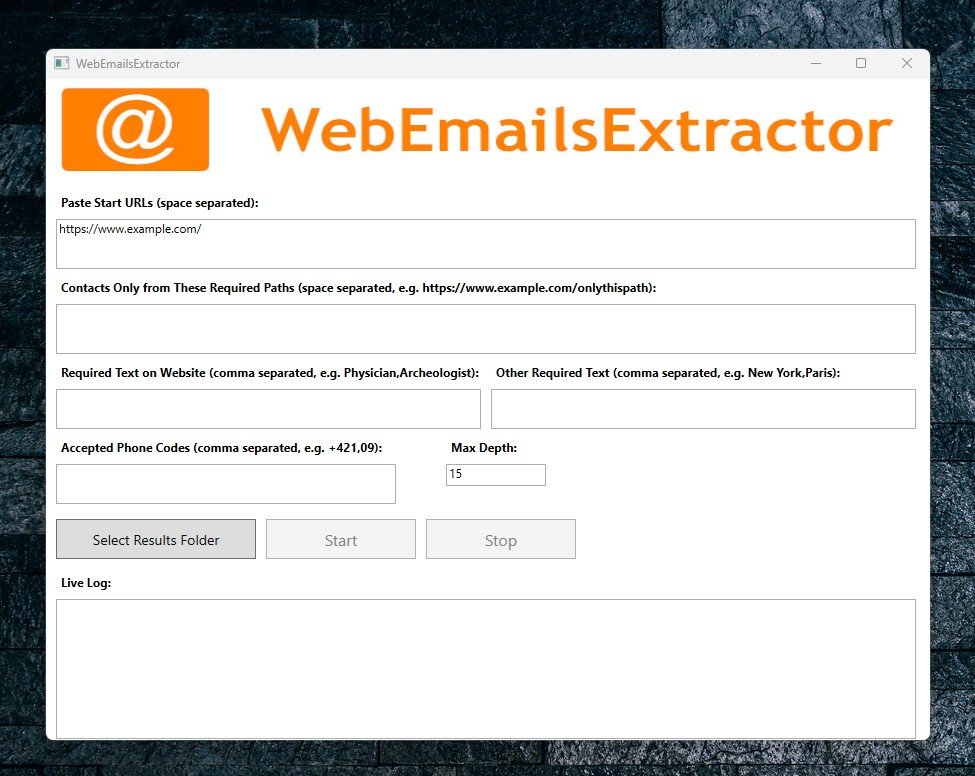
- Live Logging: Real-time progress tracking in the application
🎯 Perfect For
- B2B Sales Teams – Build prospect lists from industry directories
- Recruiters – Extract contact info from company “Our Team” pages
- Marketing Agencies – Create targeted outreach campaigns
- Researchers – Gather academic or professional contact data
- Lead Generation Specialists – Scale your prospecting workflow
📋 How It Works
- Enter Start URLs – Paste one or multiple website addresses (space-separated)
- Set Restrictions (Optional) – Define allowed paths and required keywords
- Choose Phone Codes – Filter by country codes (e.g., +421, +1) or accept all
- Select Output Folder – Pick where to save your results
- Click Start – Watch the live log as contacts are discovered
- Download Results – Get clean emails.txt and phones.txt files instantly
🔒 Ethical & Responsible
- Respects Robots.txt principles with built-in rate limiting
- Single-Domain Focus – Prevents unintended cross-site crawling
- No Hidden Connections – All processing happens locally on your machine
- Transparent Logging – See exactly which pages are being scanned
💻 Technical Specifications
| Specification | Detail |
| Platform | Windows 10/11 (.NET Framework) |
| Installation | Installed MSI file |
| Dependencies | None (standalone application) |
| Output Format | Plain text (.txt), ready for Excel/CSV import |
| Concurrency | Single-threaded (server-friendly) |
| Timeout | 10 seconds per page (configurable in source) |
📦 What’s Included
- WebEmailsExtractor.exe – Main application
- Your extracted email addresses
- Your normalized phone numbers
- Live progress logging
- One-click folder access
🆚 Free vs. Pro Version
| Feature | Free Version | Pro Version |
| Max Crawl Depth | Unlimited | Unlimited |
| Concurrent URLs | Unlimited | Unlimited |
| Keyword Filters | 1 set | 2 sets (dual filtering) |
| Phone Code Filter | ❌ | ✅ |
| Path Restrictions | ❌ | ✅ |
| Priority Support | ❌ | ✅ |
| Commercial License | ❌ | ✅ |
Bonus in Pro Version: Autosave after every next 5 extracted emails and also after evere next 5 extracted phone numbers.
Related products
-



KidGuard – Keep an eye on your child’s computer
$15.00 Add to cart
 $15.00
Do you really know what’s happening on your child’s computer when you’re not around?
The internet is full of opportunities… but also risks.
👉 KidGuard gives you clarity, control, and peace of mind — without stress or constant checking.
❤️ Built for parents who care
You don’t want to spy. You want to protect.
KidGuard helps you:
✔ understand your child’s digital habits
✔ guide them without conflict
✔ step in before problems grow👁️ See what matters
Quick View